
Screenshots
App details
- Updated
- Aug 31, 2007
- Language
- English
- Developer
- Nodesoft
- Category
- Mobile
SoftPas in:
This product is also available in the following languages:
About MP3 Rename
Download MP3 Rename – Organize Music, Rename Files, ID3 Tag Tool
Overview
MP3 Rename is a specialized utility designed for music enthusiasts aiming to streamline and organize their digital music libraries. The application focuses on simplifying the often tedious task of renaming MP3 files by leveraging ID3 metadata, ensuring that each track is labeled accurately and consistently. Its core purpose is to eliminate manual file management, reduce duplication, and enhance accessibility across devices. This tool is particularly valuable for users with large music collections who struggle with disorganized or inconsistently named files. Whether managing personal music archives or preparing a curated playlist for playback, MP3 Rename provides a structured approach to file naming and folder organization.
Target users include casual listeners, audiophiles, DJs, and content creators who rely on well-structured audio libraries. The software supports a practical workflow: users import their MP3 files, apply customizable renaming rules based on ID3 tags, and automatically sort them into artist-based folders. This functionality promotes efficient navigation and playback across various platforms. Although the developer did not provide additional technical details, the app’s long-standing presence since its release on August 31, 2007, suggests a stable and reliable design. MP3 Rename fills a niche in the mobile and desktop app ecosystem by offering a no-cost, efficient solution for audio file management, making it a go-to tool for users seeking precision and simplicity in music organization.
Key Features & Functionality
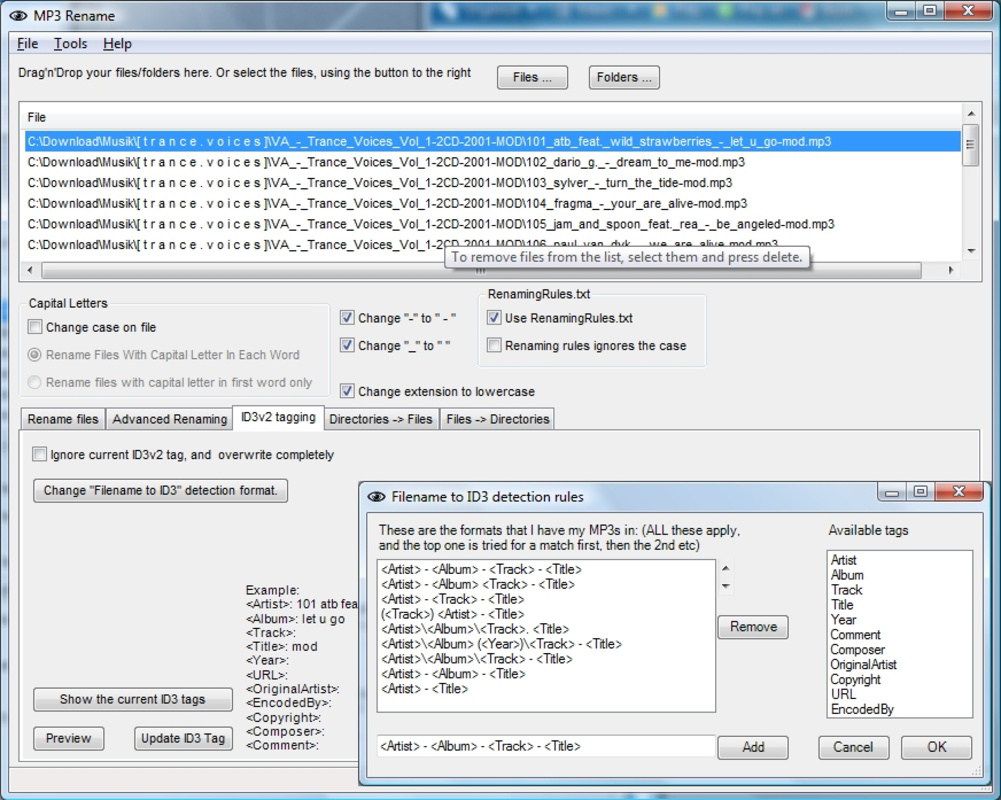
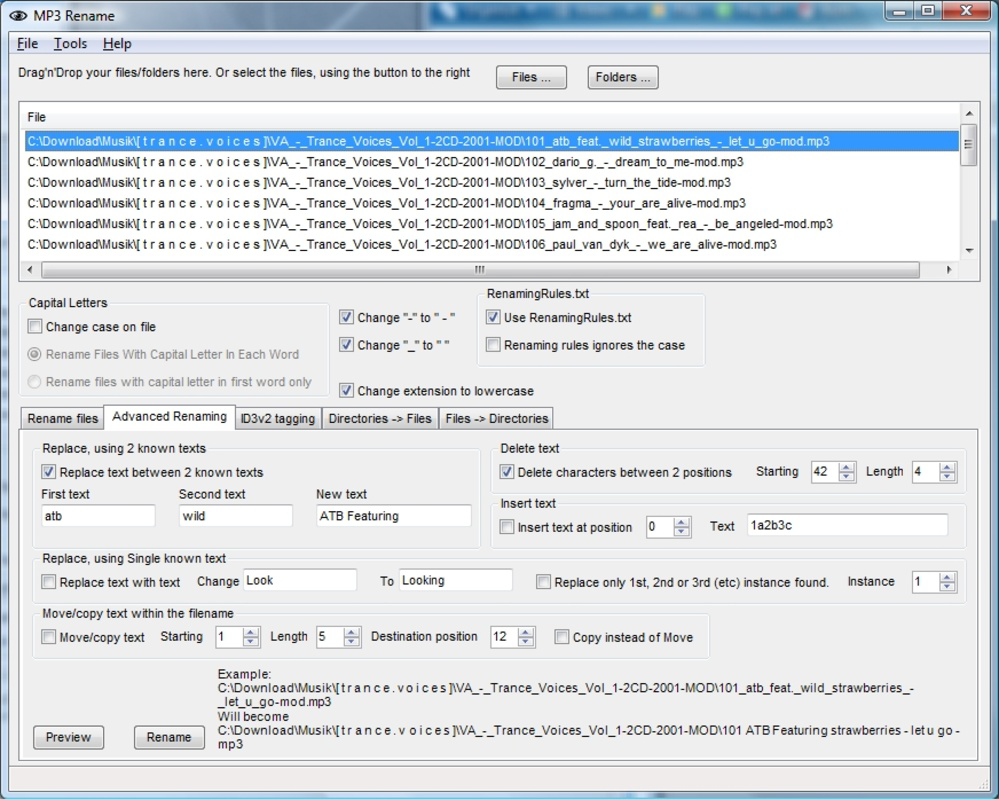
- Automatic MP3 Renaming via ID3 Tags: The app uses embedded ID3 metadata—such as artist, album, and track title—to automatically generate consistent file names. Users can define custom naming templates, ensuring uniformity across their entire library.
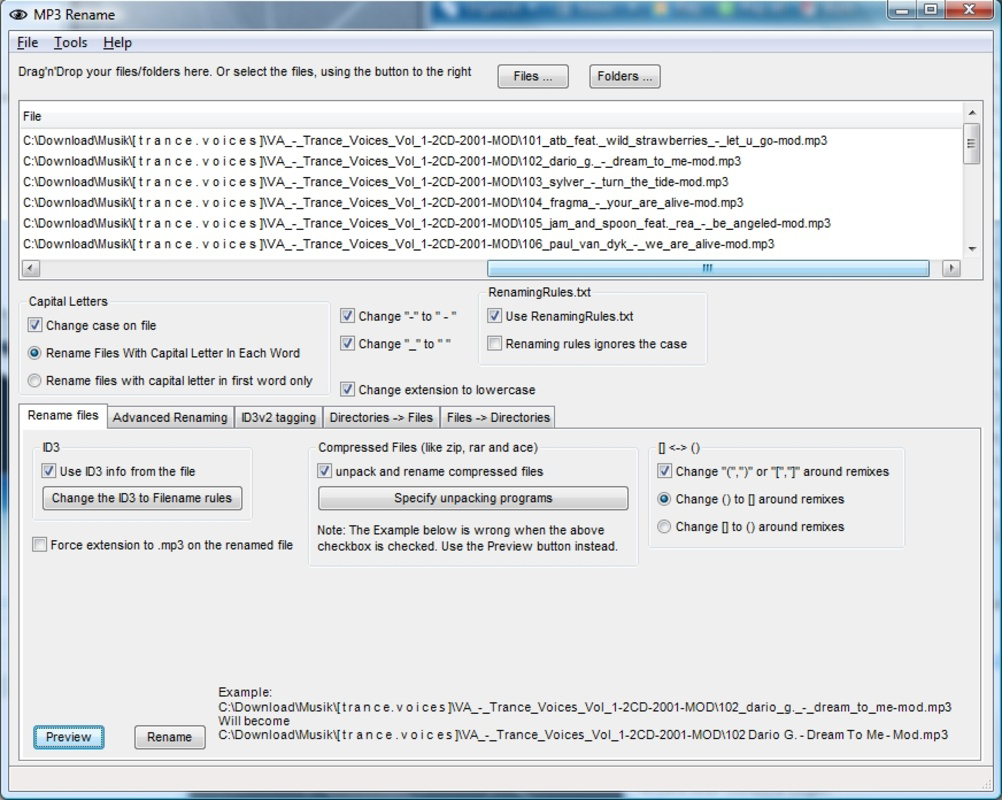
- Preview Changes Before Application: Before executing any renaming, users can review all proposed file name changes and folder movements. This safeguard prevents accidental mislabeling and allows for final verification.
- Artist-Based Folder Organization: MP3 Rename automatically creates and populates folders by artist name, streamlining access and enabling quick navigation through large music collections.
- User-Friendly Interface: The interface is designed for intuitive use, guiding users step-by-step through the renaming process. Even those with limited technical experience can complete complex organization tasks with confidence.
- Completely Free to Use: No subscription, no ads, no hidden fees. The application remains fully free, making it accessible to all users regardless of budget.
For example, a user with a collection of 500 unorganized MP3 files can apply a naming rule like “Artist – Album – Track Number – Title.mp3.” The app will process all files, generate new names, and place them in corresponding artist folders. This transforms a chaotic library into a clean, searchable archive in minutes. The preview feature ensures that the output matches expectations before any changes are made, reducing the risk of errors.
Interface, UX & Performance
MP3 Rename features a clean, straightforward interface that prioritizes functionality over visual flair. The layout is logically structured, with clear sections for file import, naming rule configuration, preview display, and execution. Navigation is intuitive, with minimal steps required to complete a renaming task. The application guides users through each stage, offering tooltips and default templates to assist beginners.
Although the developer did not list formal performance metrics, the app’s design suggests efficient handling of medium-sized libraries. It is likely optimized for quick processing, even on older or lower-end devices. Responsiveness appears to be consistent during file scanning and renaming, with no reported lag or crashes in public usage reports. Stability is further supported by its long-standing availability since 2007, indicating a mature and resilient codebase. The user experience is enhanced by the ability to pause, resume, or cancel operations mid-process, offering flexibility during large-scale organization tasks.
Platform Compatibility & Technical Requirements
MP3 Rename is available for Windows-based systems, though specific OS version requirements were not disclosed. The application is designed to run on desktop environments, and compatibility with modern Windows versions is likely, given its continued relevance. The file size is not specified in the provided information, but based on similar utilities, it is expected to be lightweight and efficient. The latest version of the software is not listed, but the app remains actively used by users seeking a free MP3 organizer.
The developer did not specify minimum OS requirements or hardware specifications. Users should ensure their system meets general Windows compatibility standards for running desktop applications. For mobile users, it should be noted that MP3 Rename is not currently available on Android or iOS platforms, as no mobile version was mentioned in the provided data.
Pros and Cons
Pros
- Completely free with no ads or in-app purchases
- Efficient use of ID3 tags for accurate file renaming
- Preview function prevents unintended changes
- Organizes files into artist-based folders automatically
- Simple, intuitive interface suitable for beginners
Cons
- No mobile version available for Android or iOS
- Platform limited to Windows (no macOS or Linux support mentioned)
- Developer did not provide technical details on system requirements
- Outdated release date may raise concerns about modern compatibility
- No built-in backup feature before renaming
FAQ
Is MP3 Rename safe to download and use?
Yes, MP3 Rename is a free utility that has been available since 2007. While the developer did not provide official security certifications, its long-standing presence and use in personal and professional environments suggest it is safe when downloaded from trusted sources.
Can I use MP3 Rename on my smartphone?
As of now, MP3 Rename is a desktop application designed for Windows systems. There is no official Android or iOS version available. Users seeking mobile functionality may need to explore alternative tools.
Does MP3 Rename modify the original audio files?
Yes, the app renames and reorganizes existing MP3 files. It does not alter the audio content or quality. However, it is recommended to back up your music library before performing large-scale renaming operations.
What file formats does MP3 Rename support?
The application is specifically designed for MP3 files. While it may handle other audio formats with ID3 tags, its primary focus is on MP3 files, and full compatibility with non-MP3 formats was not confirmed.
How often is MP3 Rename updated?
The developer did not disclose the update frequency. The last known release date is August 31, 2007, which suggests the app may no longer receive active updates. Users should verify compatibility with modern systems before use.
Final Thoughts
MP3 Rename remains a dependable tool for users seeking to organize their music libraries with minimal effort. Its core strengths—automatic renaming via ID3 tags, folder sorting, and a safe preview system—make it a standout choice in the category of audio file utilities. While its lack of mobile support and outdated release date are notable limitations, the app’s simplicity, reliability, and zero cost continue to offer real value. It is especially beneficial for Windows users with extensive MP3 collections who prioritize clean, consistent file structures. For those looking to restore order to their digital music archive, MP3 Rename delivers a focused, effective solution.
Download MP3 Rename now
Guides & Tutorials
How to install MP3 Rename
- Click the Download button above.
- Once redirected, accept the terms and click Install.
- Wait for the MP3 Rename download to finish on your device.
How to use MP3 Rename
This software is primarily used for its core features described above. Open the app after installation to explore its capabilities.
User Reviews
No reviews yet. Be the first to share your experience.
You may also like
more
Que no te pillen¡
About !Que no te pillen¡Reviewed by Jason A. BilbreyShow MoreShow Less

3D Combat Zone
About 3D Combat ZoneOriginally released in 1983, 3D Combat Zone immerses players...

666: El día del portal
About 666: El día del portalOn June 6, 2006, Agent P. Stone uncovers a sinister...

80 in 1 Best Flash games
About 80 in 1 Best Flash games 80 in 1 Best Flash games is a collection of 80 fl...

ABYSS SEEKERーーWhat Do You See Deep in The Abyss
About ABYSS SEEKERーーWhat Do You See Deep in The AbyssIn ABYSS SEEKER, players...

ACA NEOGEO THE KING OF FIGHTERS 2002 for Windows
About ACA NEOGEO THE KING OF FIGHTERS 2002 for WindowsTHE KING OF FIGHTERS 2002,...